
As FaceTime grew in popularity, there have been a handful of products created with a similar purpose. Rise in competition demands FaceTime to adapt to new features to stay competitive.
"I wish I was able to send a voicemail through FaceTime, just like how you can in a regular call."
During my time in university, I heard this complaint from other college students a handful of times while trying to reach their loved ones. Conflicting schedules or bad timing limited the ability for users to connect. With the lack of the VideoMail feature, these college students had no other option but to send a text message or to try calling again later.
Reflecting back on this observation, I was motivated to design a feature that FaceTime users can utilize when the person or group they are trying to reach is not able to answer the call.
Timeline: June 2022 - July 2022
Tools: Figma, Notion, Octopus
Role: UX Researcher, UX Designer, Usability Testing
Client: DesignLab Project
Target Audience: Apple product users
Research
Secondary Research
Contextual Inquiry &
User Interviews
Competitive Analysis
Define
Problem Statement
Goals & Objectives
Feature Roadmap
Personas
Empathy Map
Ideate
Story Board
Design
Wireflows
Interactive Prototype
Test
Usability Test
Priority Revision
Hypothesis: Implementing a VideoMail feature will keep FaceTime competitive against competitors and promote user engagement through extending the user’s communication reach.
Understand the users' motivations and paint points in using FaceTime to Understand if and how the video mail feature can add value to the product
I conducted secondary research to identify FaceTime's direct and indirect competitors. Once identified, I conducted a competitor analysis to compare the pros and cons the competitors' VideoMail features. This exercise allowed me to see what are the current fundamental elements present in VideoMail and if there are any areas of improvement which I brainstorm solutions for during the design phase.

Pros:
- Cross platform availability
- Automatic VideoMail transition at the end of an unanswered outbound call
- Option to re-record or send VideoMails after preview
- Has a simple and straightforward record and send process/buttons
- Autosaves VideoMails in an inbox to allow users to better store and manage Video Mails
- Availability of "call back" and "delete" buttons when watching each VideoMail to allow an action
Cons:
- 30 second video recording limit

Pros:
- Cross platform availability
- Available in a variety of different screens (desktop, tablet, mobile, etc.)
- Users are able to preview the VideoMails that they record before sending
- Users are able to pre-record a VideoMail greeting when they miss an inbound call, prompting other users to leave a message
- Availability of an inbox to store and manage VideoMails received
Cons:
- VideoMail option is disabled by default and users might not be aware that it available
What is the users' perspective?
To validate our hypothesis and gain better understanding of how well the VideoMail feature will be accepted by users, I conducted contextual inquiry and 1-on-1 user interviews. I observed the users' behavior after I asked the users to show me what they would do after their FaceTime call is left unanswered. I also asked the users what they expect a VideoMail feature to work and look like.
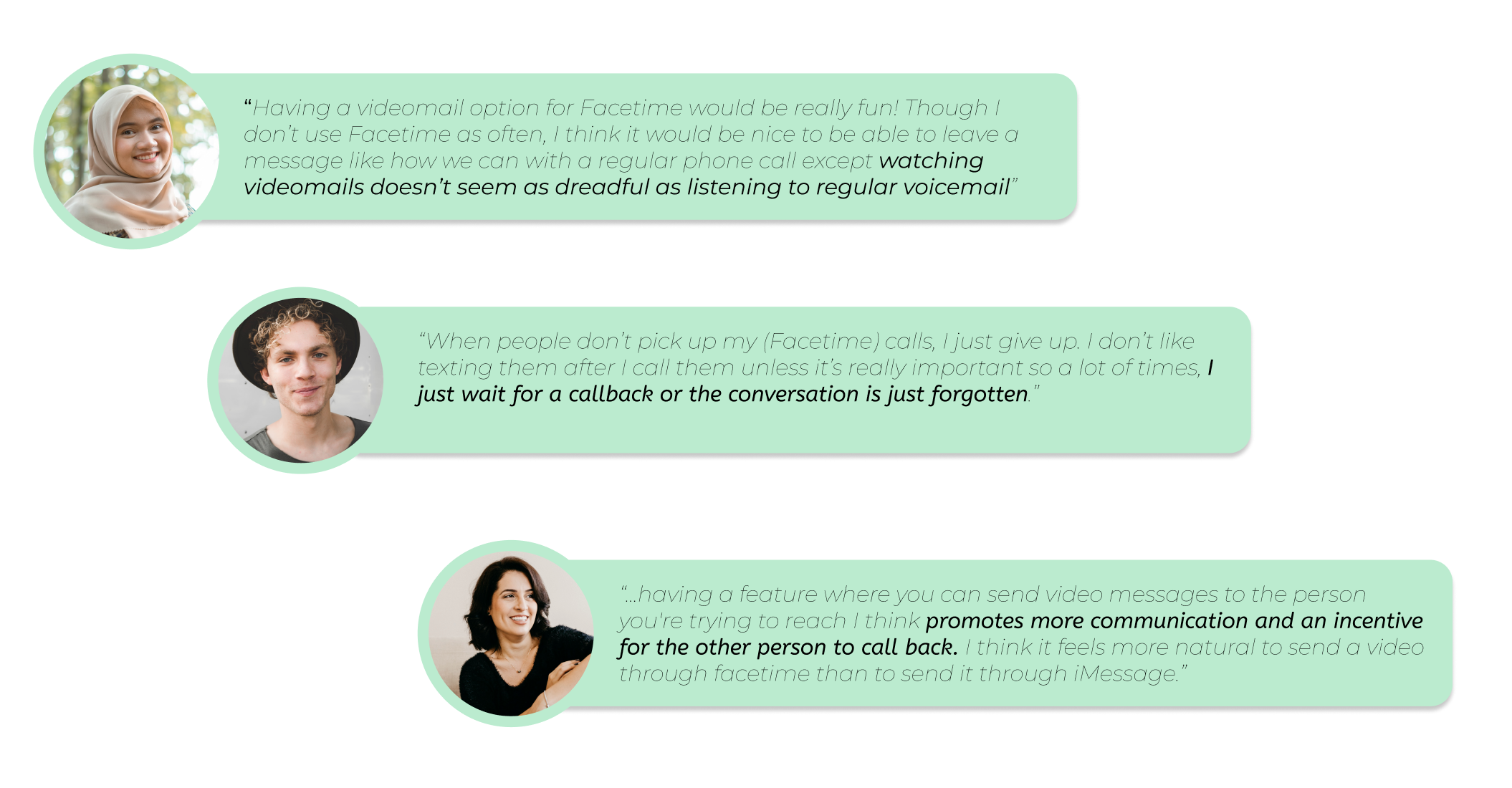
-100% of the participants stated that the main reason they use FaceTime is for casual calls to family and friends
-100% of the participants stated that they use FaceTime because it is conveniently built in their phones and is simple to use because it mimics the the same process as making a regular phone call
-100% of the participants mentioned that when their FaceTime outbound call is left unanswered, they normally don't follow up after a few tries, unless it is an urgent matter due to the extra effort and steps in takes to switch apps to text the person they are trying to reach
-100% of the participants expect the VideoMail feature to function similar like a regular voicemail
-The participants expect an inbox, option to save and delete videos, play and pause buttons, and an option to return the call
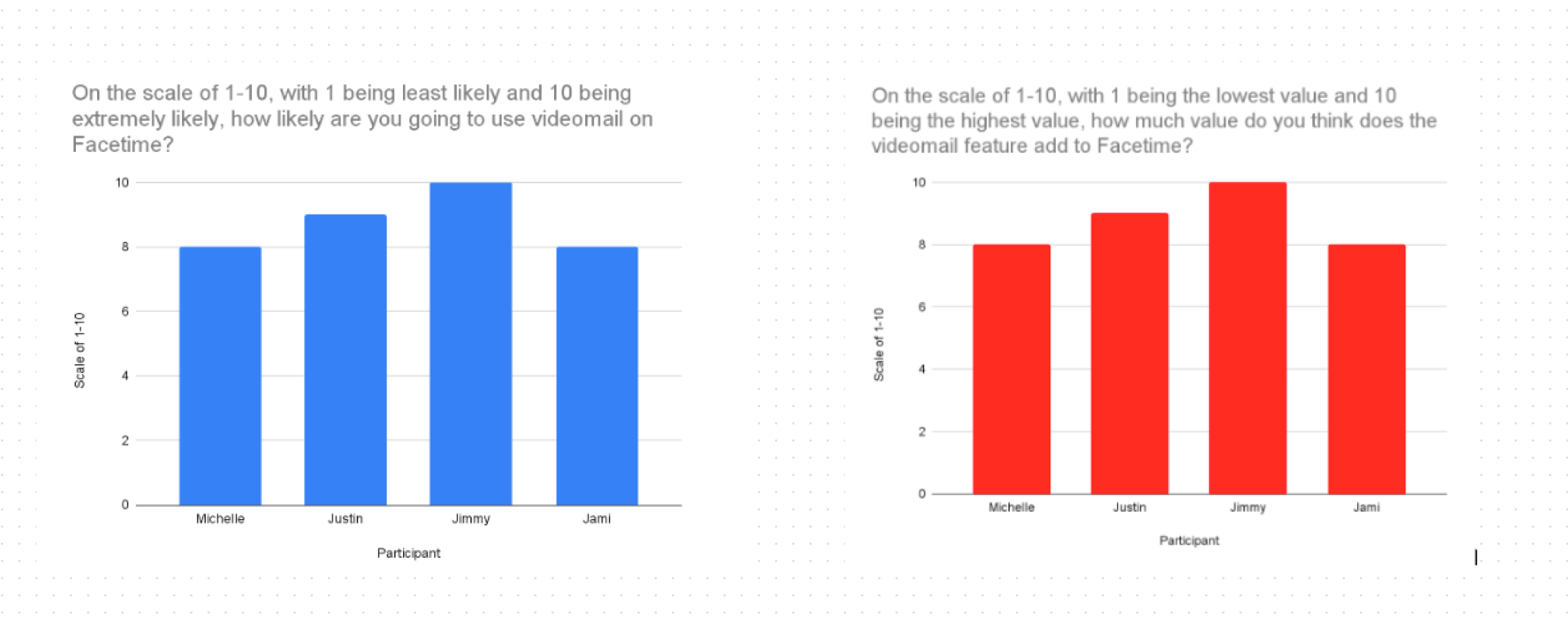
The participants also mentioned that if a VideoMail feature was to be implemented, they are likely to use the feature and believes it add great value to FaceTime. This insight positively supports our hypotheses that implementing the VideoMail feature benefits both the business and the users by providing the users a feature that they can utilize to to extend their contact reach and increase the user engagement.
With our hypothesis supported, how else can we utilize the data?
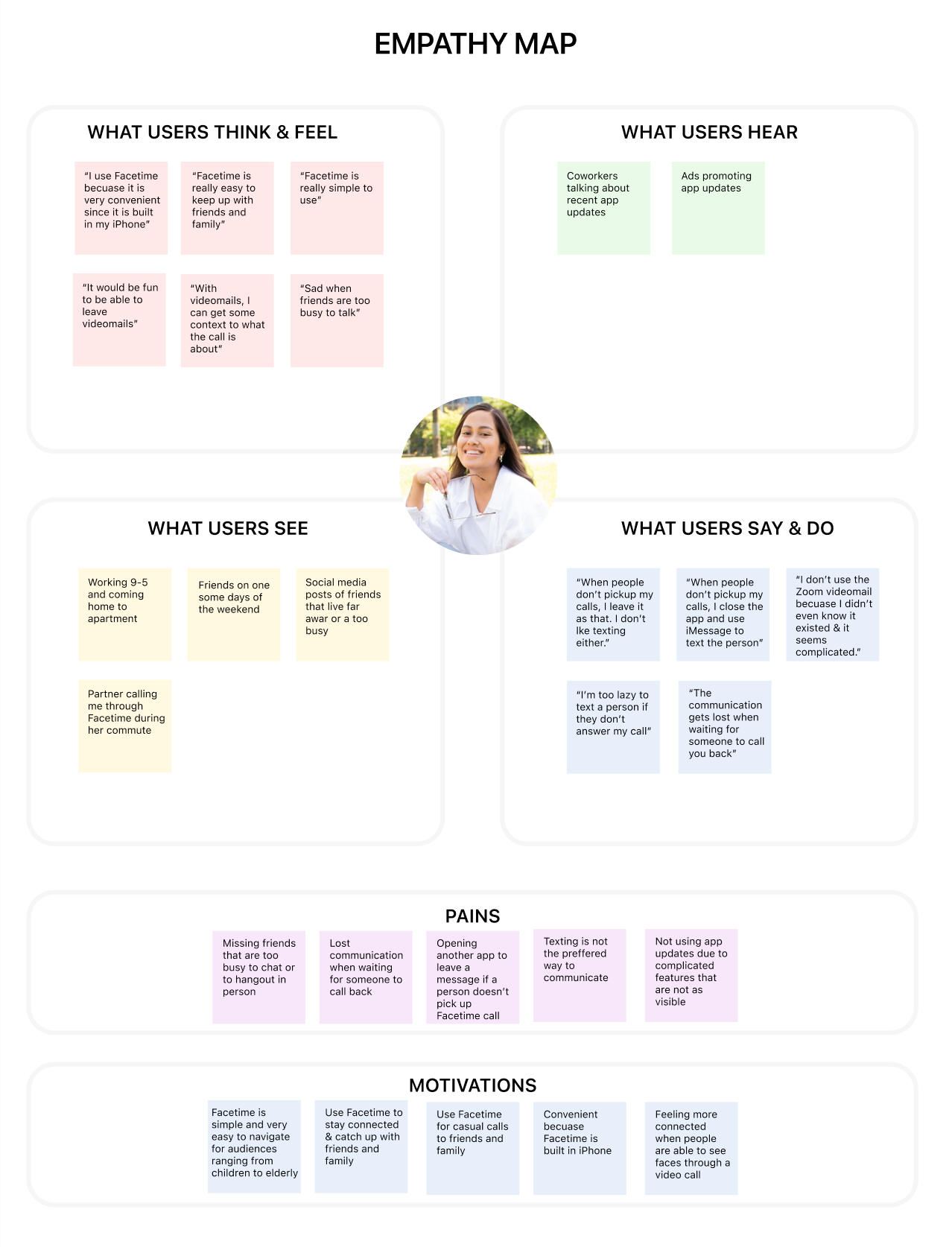
I organized the qualitative and quantitative data into an Empathy Map to better put myself in the users shoes. This exercise helps provide a holistic view of not only the users thoughts and behaviors, but also the environment and tools that can influence their experience. This process helped me understand the users' common motivations, pain points and needs through the observed behavioral patterns and reflection answers. I also gained a better understanding of how understand their thoughts and feeling about implementing a VideoMail feature on FaceTime. Overall, the users collectively believe that VideoMail is a valuable asset if implemented in FaceTime.
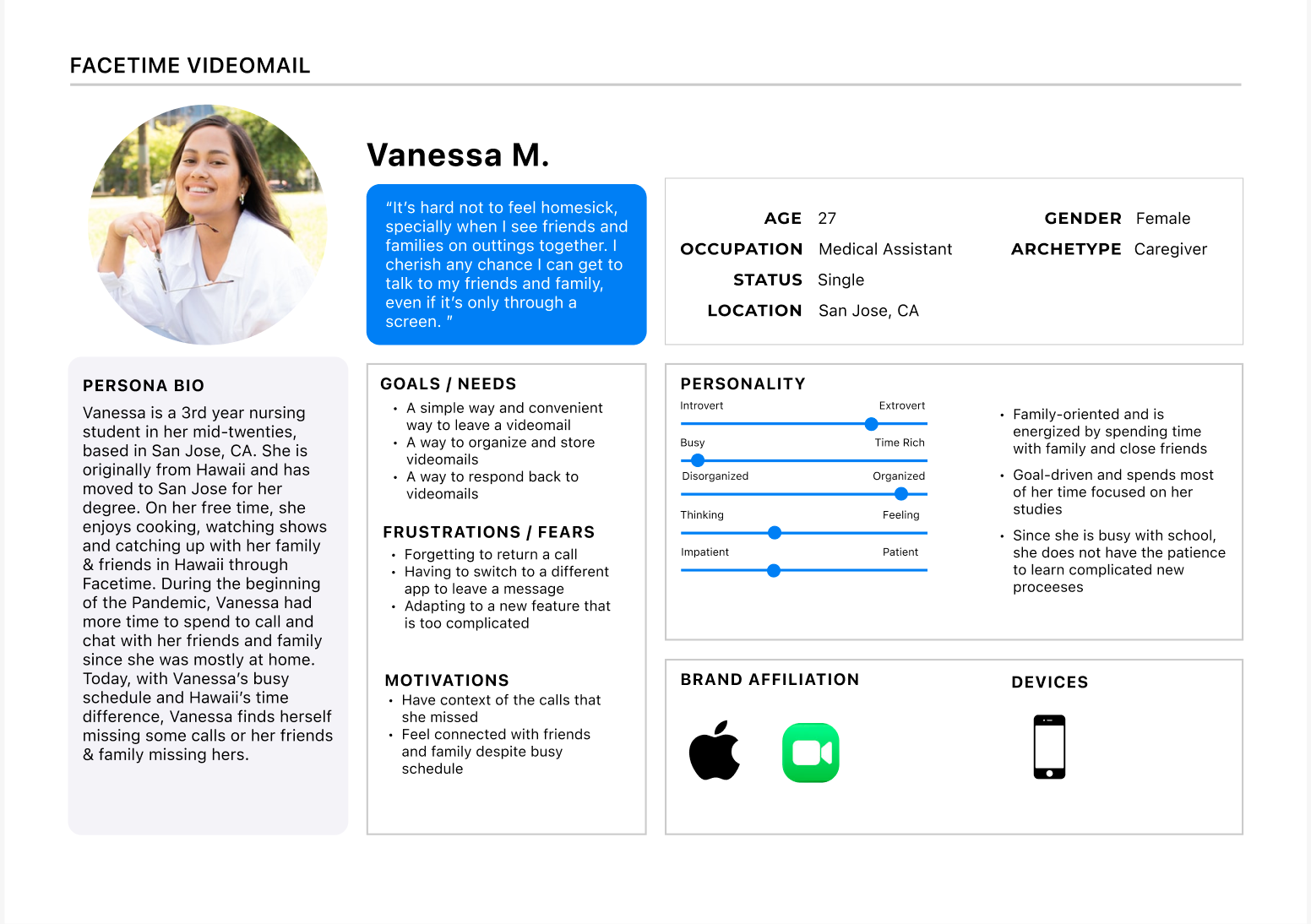
I created a Persona to bring the data we collected to life. Vanessa is a young adult who lives faraway from her father and uses FaceTime to keep in touch with her father despite their busy schedules. Creating a persona that our target users find relatable helped me envision how VideoMail would work and look like in real life. I created my design goals with Vanessa and her story in mind.
Design Goal: To create a functional, intuitive and seamlessly integrated design to support an intuitive flow within an already existing application.
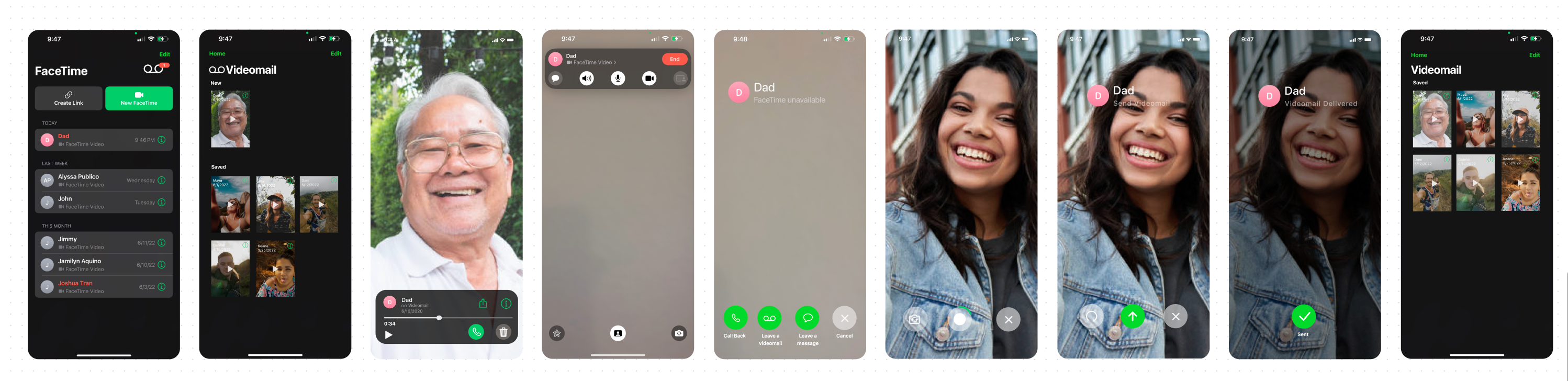
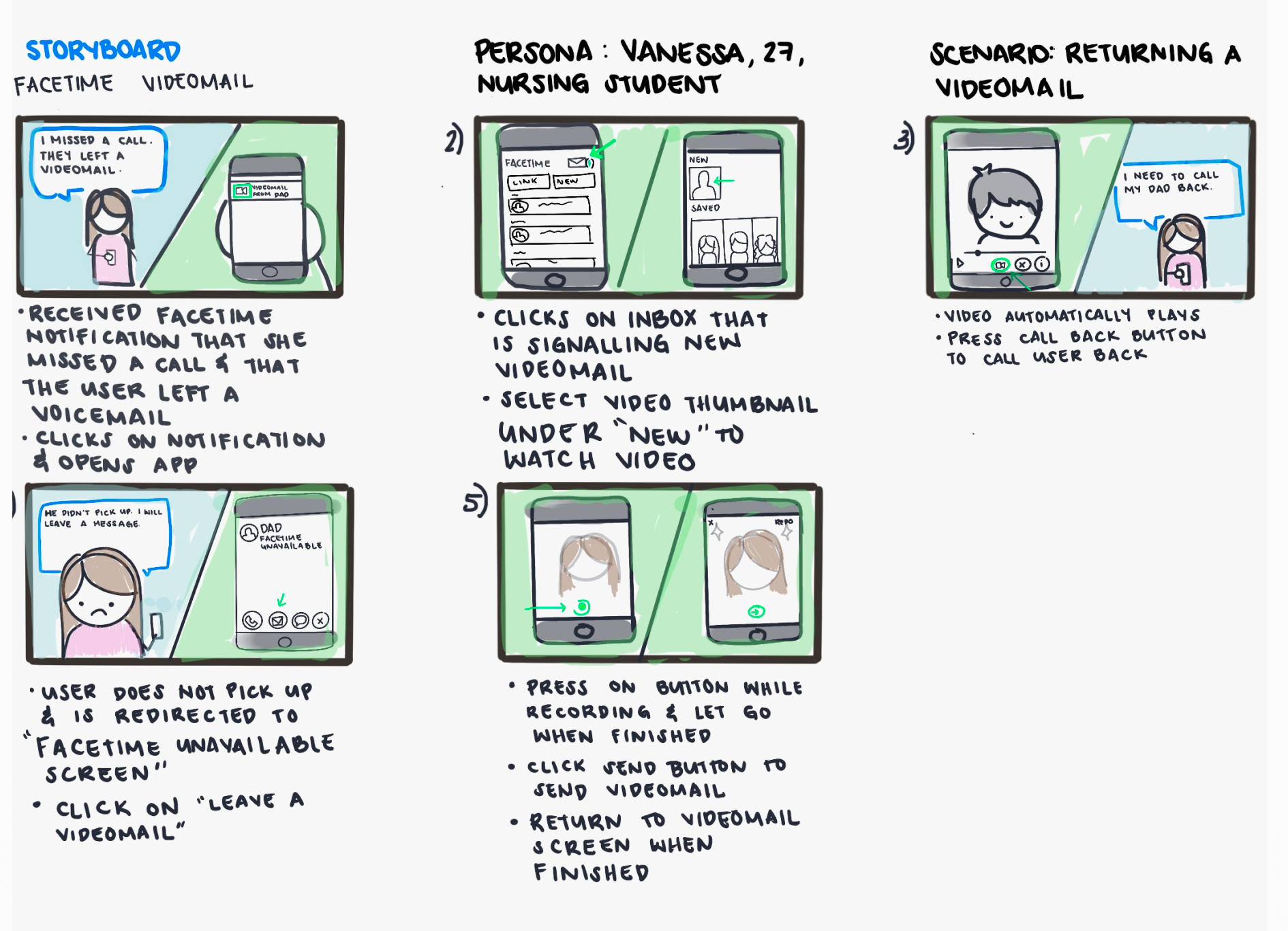
To kick start the design process, I created a Story Board to show how the user will interact with the VideoMail feature. This story portrays how Vanessa and her grandpa send each other VideoMails.The story board exhibits the screens needed to complete the tasks VideoMail was is designed for.
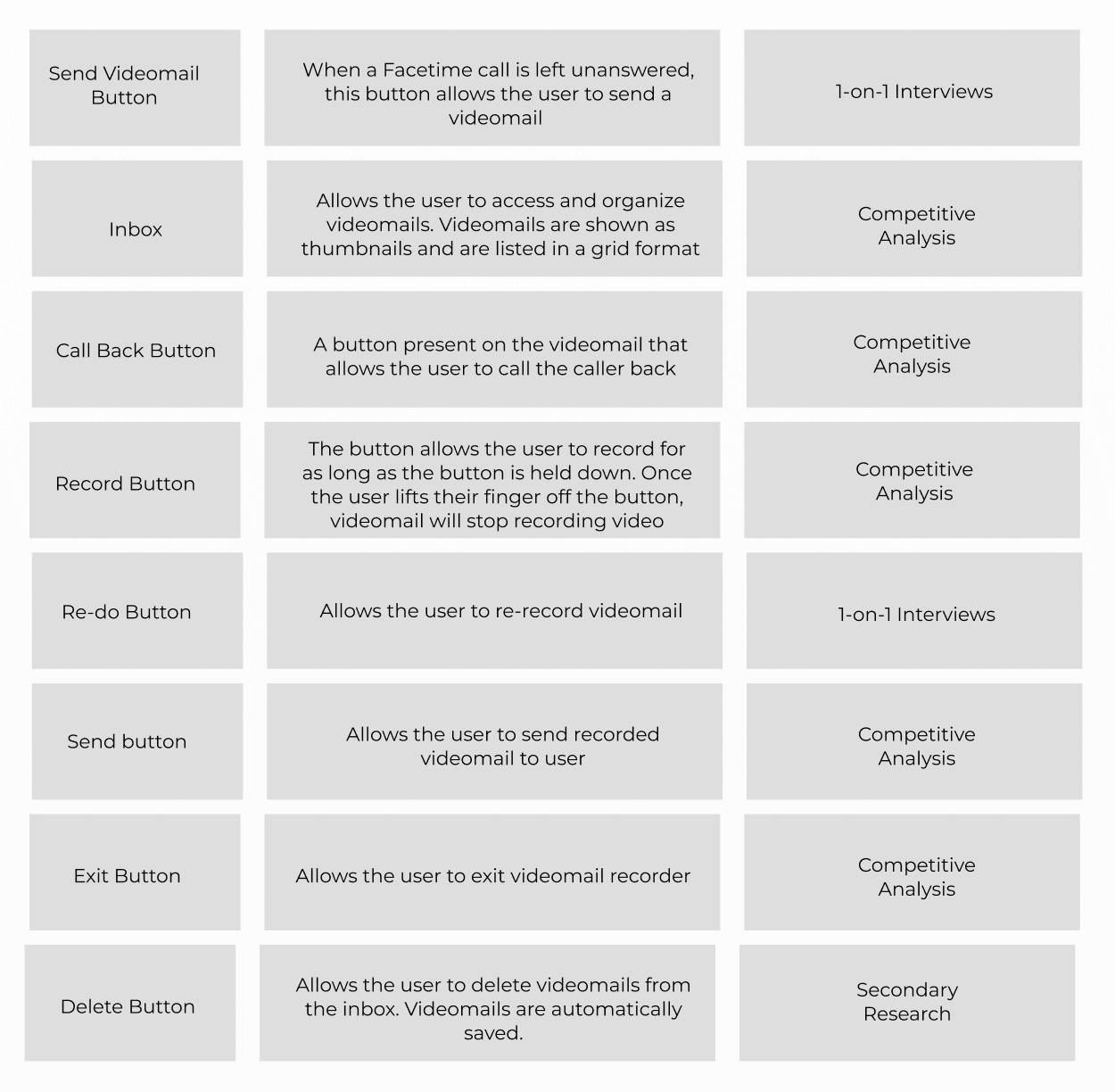
To complete the define phase, I created a list of elements/features that are essential to complete tasks. I compiled the list of features by looking at common assets listed in the competitive analysis and the user insight collected in the 1-on-1 user interviews.
With the elements and screen pages defined in the story board, I created a Wire flow and put together low fidelity wireframes and test its functionality before creating the prototype.
When designing the Wire Flow, I ensured it included the following:
- VideoMail notification icon indicating that there is a new VideoMail from another users
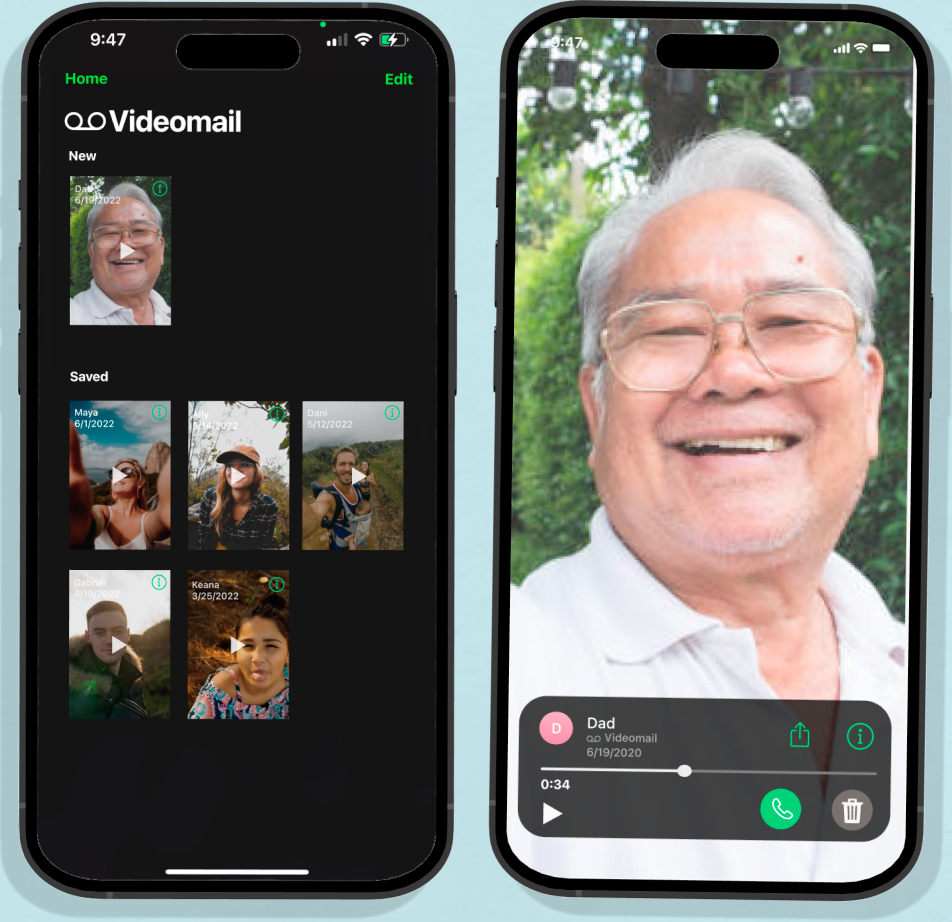
- An inbox that separates new and saved VideoMails
- A button that allows the user to call back
- An button that allows the user leave a VideoMail
- A push-to-record button
I introduced the Wire flow to a group critique for feedback. For the most part, the group stated that the flow was intuitive and very similar to the process of sending a voicemail.
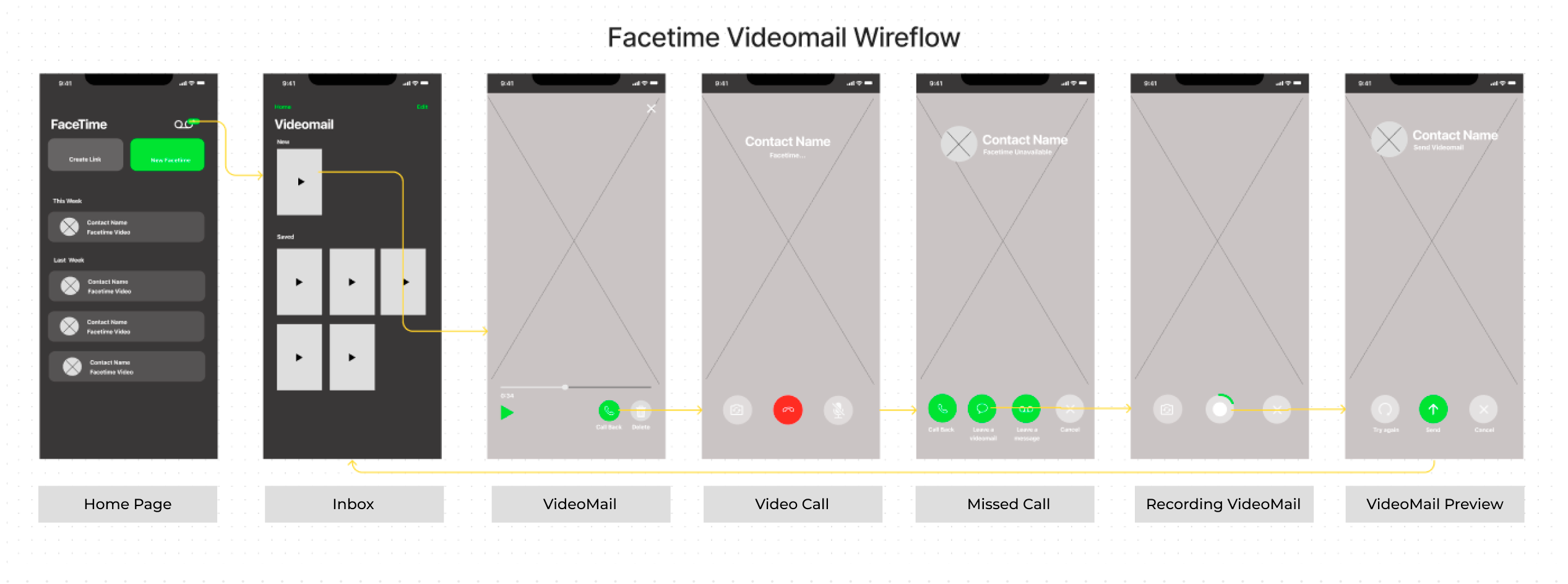
One main issue that was brought up to my attention from the group critique is that the the current flow feels incomplete because it does not notify the user that the VideoMail has been sent. I addressed the issue when I designed the first prototype by creating a confirmation screen to let the users know the VideoMail was sent successfully.
After redefining the frames that I needed, I designed the UI based on FaceTime's current style guide. Since it is already an existing app, I made sure to take not of existing UI patterns to create elements that blend well with the existing UI.
Does the design provide the users what they need to complete tasks that VideoMail is designed for?
I conducted Usability Testing with a round of reflection afterwards with participants from different generations to see how they interact with the design and how well they complete the tasks assigned.
Scenario: Dad left you a VideoMail after you missed his call. After watching the VideoMail, you decide to return the call but Dad ends up missing our call. You then leave a VideoMail for Dad.
Task:
- View Dad's VideoMail
- Return Dad's call
- Leave a VideoMail for Dad
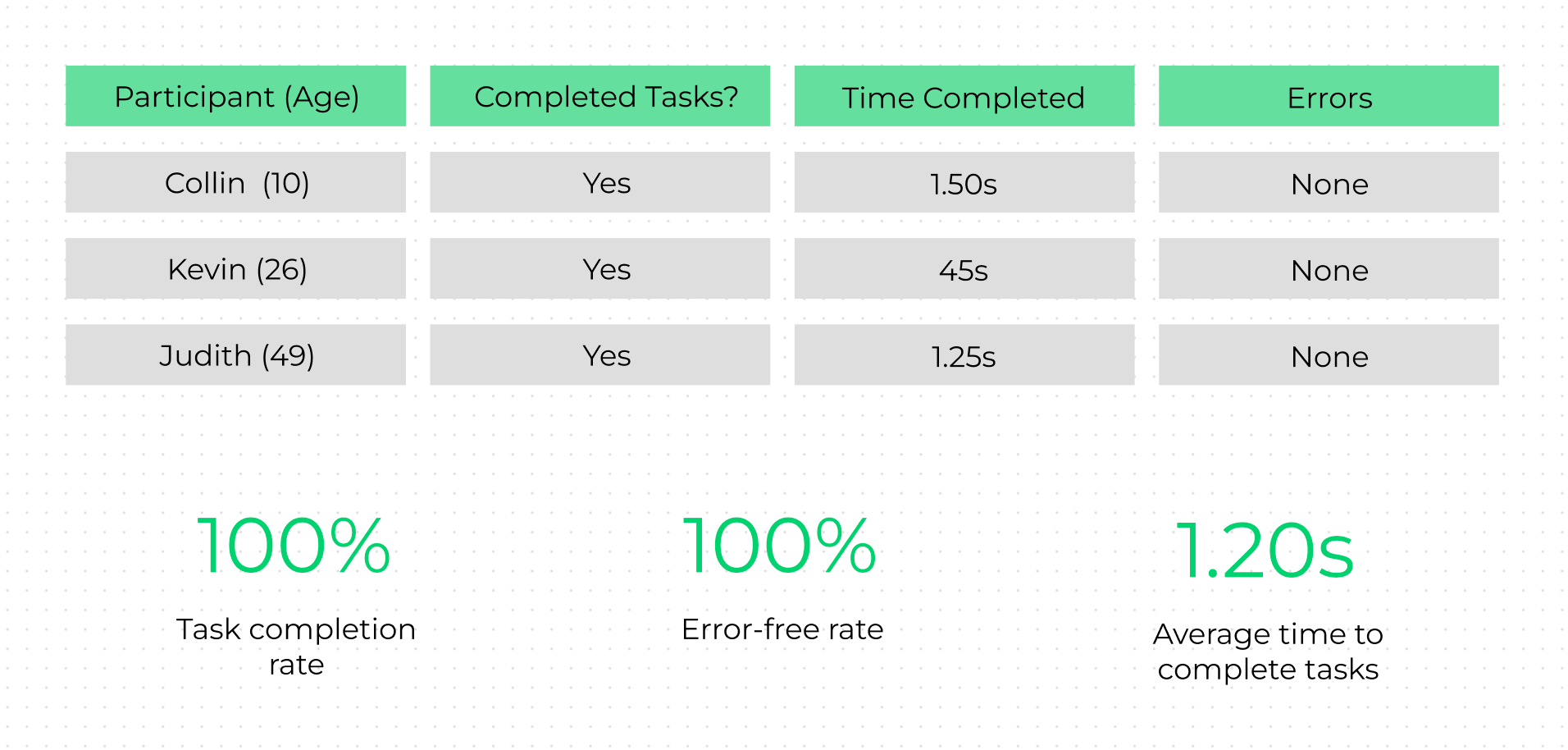
My goals for the task completions rates and error-free rate were met as presented with data presented below.
I used an Affinity Map to organize the users' reflections of their overall experience as the behaviors I observed into categories such as wins, pain point and suggestions. I then brainstormed on potential solutions to the listen pain points and reviewed the users' suggestions.
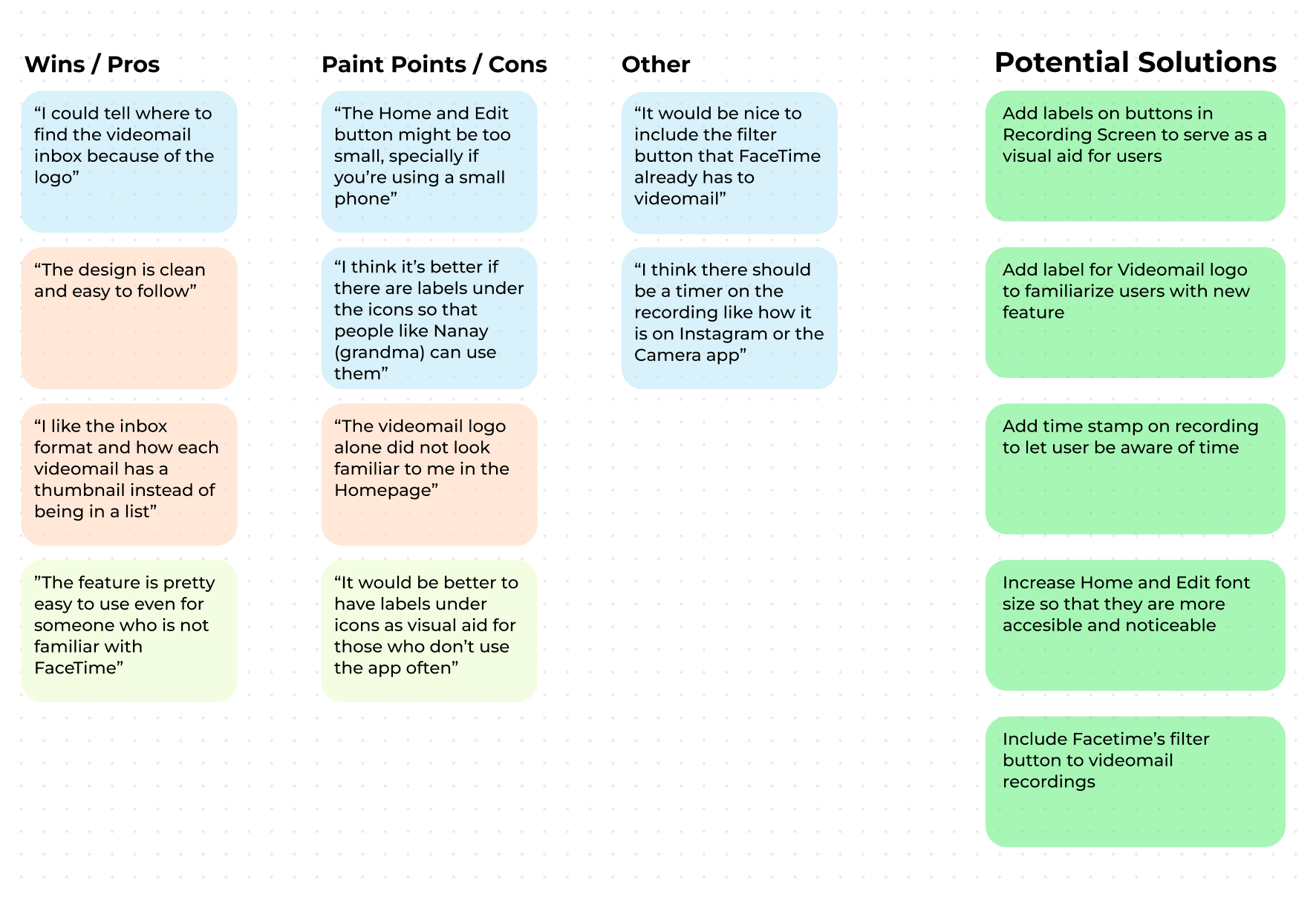
I made the improvements to increase overall accessibility and user control. I added visual aids so that the users know exactly what each icon's function is, to better guide them in their decision making process. I add a more hands-free recording button so that the users can record with ease and more flexibility. I also provided the user a choice if they want to skip the preview screen if they wish to skip steps for convenience.
View Revised Prototype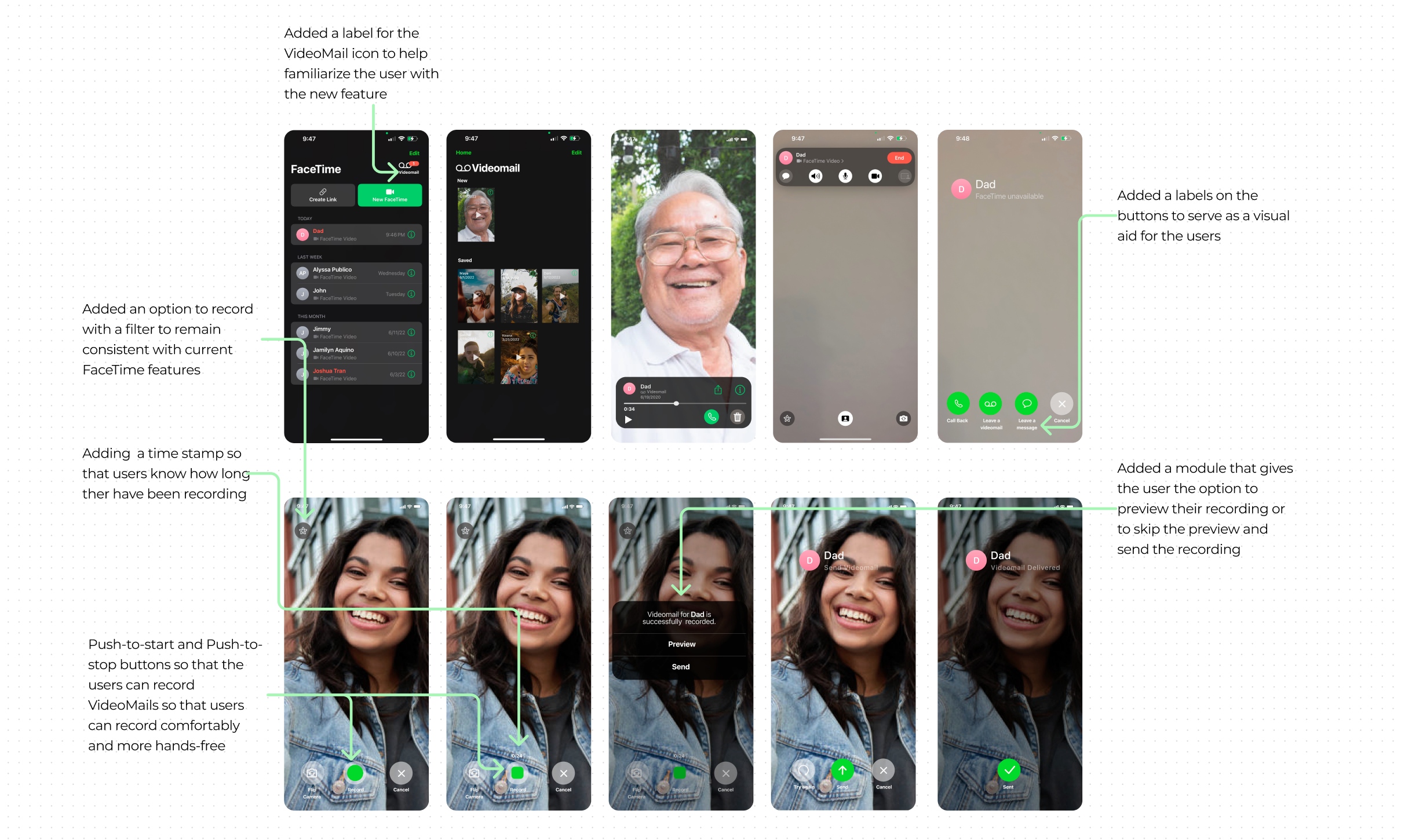
Overall, the project was quite successful because I was able to create a feature that helps FaceTime stay competitive amongst its competitors while actually adding value to the product and the expanding the services available to the users.
If I could time travel, what would I do differently?
If there was something I wish I had done different, it would be to conduct the contextual inquiry and 1-on-1 interviews with the competitors' products and users, instead of just doing contextual inquiry and interviews on the FaceTime app. Conducting such research would have provided me better data about user behaviors and attitudes for a variety of similar products, which I could have used in the competitive analysis.